
popover #
popover通常是指:
- 气泡;
- 指引;
- ...
在nPro中,popover其实就是popup,我们只需要制作popup里面的内容,或者调整popup的内容位置即可。
<n-popup :show="popVisible" pos="center" width="420rpx" height="202rpx" :leftOffset="popLeft" :bottomOffset="popBottom" :topOffset="popTop" @overlayClicked="toHidePop">
	<view class="n-bg-inverse n-flex-column n-align-center" style="width: 420rpx;height: 202rpx;border-radius: 32rpx;">
		<view class="n-flex-row n-align-center n-justify-center" style="height: 100rpx;">
			<n-icon name="eye-close" type="second" size="l"></n-icon>
			<text class="n-color-second n-size-l" style="width: 200rpx;margin-left: 12rpx;">不感兴趣</text>
		</view>
		<view style="height: 2rpx;width: 336rpx;background-color: #808080;"></view>
		<view class="n-flex-row n-align-center n-justify-center" style="height: 100rpx;" bubble="true" @click="toShowReport">
			<n-icon name="report" :stop="false" type="second" size="l"></n-icon>
			<text class="n-color-second n-size-l" style="width: 200rpx;margin-left: 12rpx;">投诉</text>
		</view>
	</view>
</n-popup>
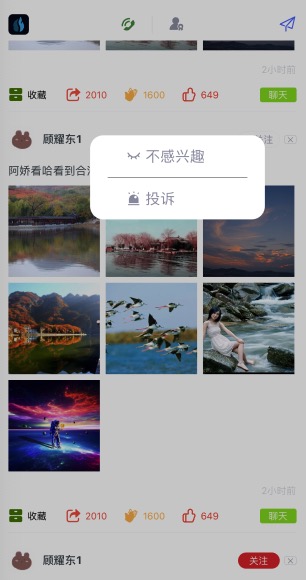
我们在popup的文档中,应该已经知道了,我们允许通过leftOffset/bottomOffset/rightOffset/topOffset来随意控制内容的位置。
上面就是我们的示范。在popover效果中,我们往往需要根据用户点击位置的不同,popup弹层显示在不同的位置。
我们的做法就是touchstart获取手指位置,然后设定弹窗内容的位置,最后弹出内容。
{
	toShowPop(e) {
		this.tempPosition = e
		this.popLeft = uni.upx2px(375) - uni.upx2px(210) - uni.upx2px(60);
		const h = uni.upx2px(101);
		let c1 = e.sY
		if (c1 + h * 2 >= this.screenHeight) {
			c1 = c1 - h
		} else {
			c1 = c1 + h
		}
		const off = c1 - this.screenHeight * 0.5
		if (off > 0) {
			this.popTop = off + 'px'
			this.popBottom = '-1'
		} else if (off < 0) {
			this.popBottom = (-1 * off) + 'px'
			this.popTop = '-1'
		} else {
			this.popTop = '-1'
			this.popBottom = '-1'
		};
		setTimeout(() => {
			this.popVisible = true
		}, 0)
	}
}